

OBSBOT Meet 2 4K Webcam: A Compact Upgrade for Streaming, Gaming, and Video Calls
If your built-in laptop camera no longer delivers the image quality you want, the OBSBOT Meet 2 4K Webcam offers a compact way to upgrade your video setup. Designed for streaming, gaming, online meetings, content creation, and everyday video calls, this Space Grey webcam combines 4K video, AI-powered framing, autofocus, HDR, and built-in dual microphones in a lightweight design.
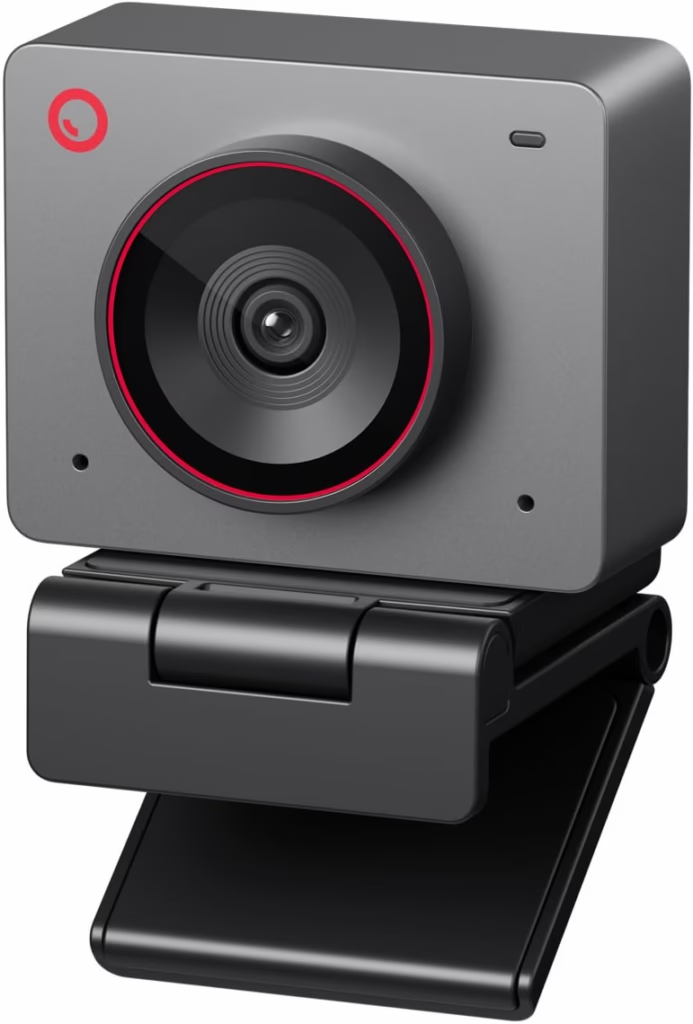
Rather than taking up valuable desk space with a large camera setup, the OBSBOT Meet 2 is designed to provide a more polished camera experience while remaining portable and easy to use.
Why the OBSBOT Meet 2 Stands Out
The OBSBOT Meet 2 is built around the idea that a good webcam should do more than simply capture your face. It combines imaging technology with AI-assisted features to help keep you properly framed while you are on camera.
According to the Amazon product listing, the webcam features a 1/2-inch sensor, AI framing, autofocus, Beauty Mode, HDR, gesture control, dual microphones, and support for up to 60 FPS.
For people who regularly switch between work meetings, gaming sessions, livestreams, and content creation, having these features in one compact webcam can make the setup considerably simpler.
4K Video for Sharper, More Detailed Images
One of the biggest attractions of the OBSBOT Meet 2 is its 4K video capability.
The webcam supports video recording and streaming at up to 4K at 30 FPS, while 1080p can reach 60 FPS.
This gives users flexibility depending on what they are doing.
For example:
- 4K at 30 FPS can provide greater image detail for compatible applications.
- 1080p at 60 FPS is useful when smoother motion is more important.
- The webcam can be used for streaming, meetings, gaming, and content creation.
Whether you’re presenting during a virtual meeting or creating videos for your audience, higher-resolution video can help create a cleaner and more professional-looking presentation.
AI Auto Framing Keeps You in the Shot
Moving around while on camera can sometimes leave you positioned too far to one side of the frame. The OBSBOT Meet 2 addresses this with AI Auto Framing.
Its AI-assisted framing technology is designed to recognize the subject and maintain an appropriate composition. This can be particularly useful for presenters, streamers, educators, and creators who don’t want to constantly adjust their camera position.
The feature can make a difference when you’re talking, presenting, or moving naturally during a video session.
Autofocus for a More Reliable Picture
Nobody wants to appear blurry during an important video call.
The OBSBOT Meet 2 includes autofocus technology designed to keep the subject sharp. The camera also uses a 1/2-inch sensor and an f/1.8 aperture, specifications that are intended to help it capture more light and maintain image quality across different environments.
This makes the webcam suitable for a variety of desktop setups, from a home office to a gaming desk or content-creation workspace.
Built-In Dual Microphones
Video quality is only part of the equation. Clear audio is equally important when you’re communicating online.
The OBSBOT Meet 2 includes dual omnidirectional microphones with noise reduction and automatic gain control.
That makes the built-in microphone useful for everyday applications such as:
- Zoom and video meetings
- Online classes
- Gaming
- Livestreaming
- Voice communication
- Content creation
For more demanding professional audio recording, users may still prefer a dedicated microphone, but having built-in microphones makes the webcam convenient for everyday use.
Compact and Lightweight Design
A major advantage of the Meet 2 is its compact form factor.
The webcam weighs approximately 40.5 grams, making it easy to move between different setups.
This can be especially useful if you work from different locations or don’t want a bulky camera permanently occupying your desk.
Its Space Grey finish also fits naturally into modern computer and gaming setups.
Flexible Mounting Options
The OBSBOT Meet 2 is designed to work with different mounting arrangements. It includes a foldable magnetic mount and a 1/4″-20 tripod interface, allowing it to be attached to compatible tripods and other mounting equipment.
A magnetic privacy cover is also included to help cover the lens when the webcam is not being used.
For users who care about privacy, this is a simple but useful feature.
Who Is the OBSBOT Meet 2 For?
The OBSBOT Meet 2 can be a practical choice for several types of users.
Remote Workers
If your laptop’s built-in webcam doesn’t provide the image quality you want for professional meetings, an external 4K webcam can offer a more advanced camera setup.
Streamers and Gamers
AI framing, autofocus, high-resolution video, and built-in microphones make the Meet 2 suitable for gaming streams and online content.
Content Creators
Creators who record tutorials, product demonstrations, educational videos, or social media content can benefit from the combination of 4K resolution and automatic framing.
Online Students and Teachers
A dedicated webcam can provide a more flexible setup than a laptop camera, particularly for presentations and online classes.
OBSBOT Meet 2 Key Features
Here’s a quick overview of what this webcam brings to your setup:
| Feature | OBSBOT Meet 2 |
| Video Resolution | Up to 4K |
| Maximum 4K Frame Rate | 30 FPS |
| 1080p Frame Rate | Up to 60 FPS |
| Sensor | 1/2-inch |
| AI Framing | Yes |
| Autofocus | Yes |
| HDR | Yes |
| Microphones | Dual omnidirectional |
| Gesture Control | Yes |
| Privacy Cover | Magnetic |
| Mounting | Magnetic mount + 1/4″-20 tripod interface |
| Color | Space Grey |
| Weight | Approximately 40.5g |
Specifications and features are based on the Amazon listing and product information available for the OBSBOT Meet 2.
Is the OBSBOT Meet 2 Worth Considering?
For users looking to upgrade from a basic built-in laptop webcam, the OBSBOT Meet 2 brings several useful features into one compact device.
Its combination of 4K video, AI Auto Framing, autofocus, HDR, dual microphones, gesture control, and lightweight construction makes it suitable for a broad range of everyday video applications.
The biggest appeal is its versatility. You can use the same webcam for work meetings during the day, gaming or streaming in the evening, and content creation whenever inspiration strikes.
Final Thoughts
The OBSBOT Meet 2 4K Webcam is designed for users who want a more capable camera without building an overly complicated recording setup.
With 4K video, AI-powered framing, autofocus, HDR, dual microphones, and a lightweight Space Grey design, it offers a combination of features aimed at modern video communication and content creation.
If you’re upgrading your home office, gaming setup, streaming station, or creator workspace, the OBSBOT Meet 2 is a webcam worth putting on your shortlist.
Check the latest availability, configuration, and pricing on Amazon before purchasing.



Saat ini belum tersedia komentar